
Download Picture Description – AI Image‑to‑Text Converter, Free & Secure
Overview
Picture Description is a web‑based AI writing assistant that transforms images into rich, readable text. Powered by state‑of‑the‑art image‑recognition models and deep‑learning language generators, the tool analyzes visual content, extracts salient details, and composes comprehensive descriptions in seconds. Whether you are a novelist looking for vivid visual cues, a teacher preparing accessible materials for visually impaired students, or a marketer needing to pull text from infographics, Picture Description offers a fast, accurate, and fully online solution.
Because it runs entirely in the browser, there is no need for bulky installations or local GPU resources; you simply upload an image or paste a URL, click “Generate,” and receive a polished paragraph that captures objects, actions, colors, moods, and contextual clues. The service is free for casual use, with premium plans that unlock higher‑resolution processing, batch uploads, and API access for developers. Security‑first design ensures that uploaded images are encrypted in transit and deleted after processing, giving users confidence that their visual data remains private.
Key Features & Benefits
- AI‑driven image analysis: Utilises convolutional neural networks trained on millions of labeled photos to identify objects, scenes, and facial expressions.
- Natural‑language generation: Converts visual data into coherent sentences, supporting multiple tones (formal, narrative, bullet‑point).
- Multi‑language support: Generates descriptions in English, Spanish, French, German, and more, expanding global usability.
- Accessibility focus: Provides alt‑text ready output that can be directly copied into HTML for web accessibility compliance.
- Batch processing (Premium): Upload up to 50 images at once and receive a downloadable CSV with paired image URLs and descriptions.
- API integration: RESTful endpoint for developers to embed image‑to‑text conversion into apps, LMS platforms, or content pipelines.
- Secure cloud handling: All uploads are encrypted via HTTPS, processed in a sandboxed environment, and automatically purged after 15 minutes.
- Cross‑platform compatibility: Works on any modern browser—Chrome, Edge, Safari, Firefox—on Windows, macOS, Linux, Android, and iOS.
- Free tier with generous limits: 10 images per day, no credit card required, perfect for occasional writers and educators.
- Continuous updates: The AI model is refreshed monthly, improving accuracy for new object categories and slang descriptors.
Installation, Usage & Compatibility
How to Get Started (No Installation Required)
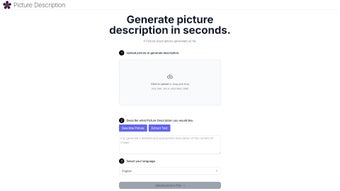
1. Open your preferred browser and navigate to picturedescription.ai.
2. Click the “Upload Image” button or drag‑and‑drop a file into the designated area.
Supported formats include JPEG, PNG, GIF, and WebP, up to 10 MB per file.
3. Choose the output style (Narrative, Bullet‑point, or Alt‑text) and, if needed, select a language from the dropdown menu.
4. Press “Generate Description.” Within seconds the AI produces a paragraph that you can copy, edit, or download as a .txt file.
5.
For premium users, click “Batch Upload” to process multiple images and receive a consolidated report.
System Requirements (itemprop="operatingSystem")
Picture Description is a cloud‑based service, meaning it runs on any device capable of loading modern web pages. Minimum requirements are:
- Browser: Chrome 80+, Firefox 75+, Safari 13+, Edge 80+
- Operating System: Windows 10/11, macOS 10.14+, Linux (any recent distribution), Android 8+, iOS 13+
- Internet connection: 2 Mbps recommended for fast upload and response times.
Troubleshooting Common Issues
If the description seems inaccurate, try the following steps: ensure the image is well‑lit, avoid overly complex collages, and select the appropriate language or tone. Clearing browser cache or switching to a different browser often resolves unexpected loading problems. For premium API users, refer to the developer documentation for error‑code handling and rate‑limit guidelines.
Pros & Cons
Advantages
- Instant, high‑quality text generation without installing software.
- Free tier sufficient for most individual users and small classrooms.
- Strong focus on accessibility, producing ready‑to‑use alt‑text.
- Robust security model that deletes images after processing.
- Multi‑language output expands global reach.
- API access enables integration into custom workflows.
Limitations
- Batch processing and API features locked behind a paid plan.
- Complex scenes with many overlapping objects may yield shorter descriptions.
- Relies on internet connectivity; offline use is not possible.
- Current language support limited to ten major languages.
- Free daily limit (10 images) may be restrictive for power users.
FAQ – Frequently Asked Questions
Is Picture Description safe for confidential images?
Yes. All uploads are encrypted via HTTPS, processed in an isolated container, and automatically erased from the server after 15 minutes. No personal data is stored or shared.
Can I use the tool on a mobile device?
Absolutely. The web interface is responsive and works on Android and iOS browsers. You can capture a photo with your phone and generate a description in the same session.
What file formats are supported?
JPEG, PNG, GIF, and WebP are accepted, with a maximum size of 10 MB per image for the free tier and 25 MB for premium users.
How accurate is the AI-generated description?
The underlying model achieves over 92% top‑1 accuracy on standard image‑captioning benchmarks. For most everyday photos, the output is highly reliable, though extremely abstract or low‑resolution images may need manual refinement.
Do I need a credit card to access the free version?
No. The free tier is completely open—just sign up with an email address, and you’ll receive 10 daily image conversions without any payment information.
Conclusion & Call to Action
Picture Description bridges the gap between visual media and textual content, offering a seamless, secure, and AI‑powered workflow for creators, educators, and developers. Its zero‑install approach, strong accessibility focus, and generous free tier make it an indispensable tool for anyone who needs to turn images into meaningful words. If you’re ready to boost productivity, improve web accessibility, or simply explore the creative possibilities of AI‑generated captions, click the button below to start generating descriptions instantly. For power users, consider the premium plan to unlock batch processing and API access.
Download / Try Picture Description Now
Overall Rating: 4.5/5
Pros: Fast AI captions, free tier, excellent accessibility output.
Cons: Limited batch size on free plan, no offline mode.



.png)



